


Fan de GDI+ depuis la première heure, j’ai sous la main un certain nombre de codes très sympathique. Je vous propose ici de partager l’un de mes favoris, le dégrader façon Vista (à la mode depuis quelques années sur toute interface qui se veut un peu sexy)
Avant de donner le code, voici le genre de rendu que peut permettre cette méthode.
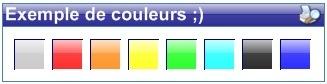
Et le code qui permet de dessiner le dégradé de fond :
Cette méthode prend quatre arguments :
- Le Graphics sur lequel on dessine.
- La zone (Rectangle) dans laquelle on va dessine.
- La Couleur à dessiner.
- Eventuellement le tracé d’un masque (GraphicsPAth) si on veut remplir une forme un peut particulière et nom pas un simple rectangle.
Et pour ne fâcher personne, voici les 2 versions du code (Vb et C#)
Vb
        ''' <summary>
        ''' Fond type Aéro glass
        ''' </summary>
        ''' <param name="vG"></param>
        ''' <param name="vRect"></param>
        ''' <param name="vColor"></param>
        ''' <param name="vMasque"></param>
        Public Sub PaintBackAeroGlass(ByVal graphics As Graphics,ByVal zone As Rectangle, ByVal couleur As Color, ByVal masque As GraphicsPath)
            Dim Int_Heiht As Int32
            Dim rect1, rect2 As Rectangle

            Dim brush1 As LinearGradientBrush = Nothing
            Dim brush2 As LinearGradientBrush = Nothing

            Try
                Int_Heiht = Convert.ToInt32(zone.Height / 2)
                rect1 = New Rectangle(zone.X, zone.Y, zone.Width, Int_Heiht)
                rect2 = New Rectangle(zone.X, zone.Y + Int_Heiht, zone.Width, zone.Height - Int_Heiht)

                brush1 = New LinearGradientBrush( _
                    rect1, _
                    Color.FromArgb(50, couleur), _
                    Color.FromArgb(160, couleur), _
                    LinearGradientMode.Vertical)

                brush2 = New LinearGradientBrush( _
                    rect2, _
                    Color.FromArgb(190, couleur), _
                    Color.FromArgb(210, couleur), _
                    LinearGradientMode.Vertical)

                ' Paint des 2 rect
                If masque Is Nothing Then

                    ' sans masque
                    graphics.FillRectangle(new SolidBrush(Color.White), zone)
                    graphics.FillRectangle(brush1, rect1)
                    graphics.FillRectangle(brush2, rect2)

                Else

                    Region r = null
                    Try
                        ' Avec masque
                        graphics.FillPath(New SolidBrush(Color.White), masque)

                        r = New Region(masque)
                        r.Intersect(rect1)
                        graphics.FillRegion(brush1, r)

                        r = New Region(masque)
                        r.Intersect(rect2)
                        graphics.FillRegion(brush2, r)

                    Finally

                        //Libération mémoire
                        if (r != null) r.Dispose();
                        r = null;
                    End Try
                End If

            Catch

            Finally
                if brush1 IsNot Nothing Then brush1.Dispose()
                brush1 = Nothing
                if brush2 IsNot Nothing Then brush2.Dispose()
                brush2 = Nothing
            End Try
        End Sub
C#
        /// <summary>
        /// Fond type Aéro glass
        /// </summary>
        /// <param name="vG"></param>
        /// <param name="vRect"></param>
        /// <param name="vColor"></param>
        /// <param name="vMasque"></param>
        private void PaintBackAeroGlass(Graphics graphics, Rectangle zone, Color couleur, GraphicsPath masque)
        {
            Int32 Int_Heiht;
            Rectangle rect1, rect2;

            LinearGradientBrush
                brush1 = null,
                brush2 = null;

            try
            {
                Int_Heiht = Convert.ToInt32(zone.Height / 2);
                rect1 = new Rectangle(zone.X, zone.Y, zone.Width, Int_Heiht);
                rect2 = new Rectangle(zone.X, zone.Y + Int_Heiht, zone.Width, zone.Height - Int_Heiht);

                brush1 = new LinearGradientBrush(
                    rect1,
                    Color.FromArgb(50, couleur),
                    Color.FromArgb(160, couleur),
                    LinearGradientMode.Vertical);

                brush2 = new LinearGradientBrush(
                    rect2,
                    Color.FromArgb(190, couleur),
                    Color.FromArgb(210, couleur),
                    LinearGradientMode.Vertical);

                //Paint des 2 rect
                if (masque == null)
                {
                    //sans masque
                    graphics.FillRectangle(new SolidBrush(Color.White), zone);
                    graphics.FillRectangle(brush1, rect1);
                    graphics.FillRectangle(brush2, rect2);
                }
                else
                {
                    Region r = null;
                    try
                    {
                        //Avec masque
                        graphics.FillPath(new SolidBrush(Color.White), masque);

                        r = new Region(masque);
                        r.Intersect(rect1);
                        graphics.FillRegion(brush1, r);

                        r = new Region(masque);
                        r.Intersect(rect2);
                        graphics.FillRegion(brush2, r);
                    }
                    finally
                    {
                        //Libération mémoire
                        if (r != null) r.Dispose();
                        r = null;
                    }
                }
            }
            catch { }
            finally
            {
                if (brush1 != null) brush1.Dispose();
                brush1 = null;
                if (brush2 != null) brush2.Dispose();
                brush2 = null;
            }
        }







 Jeu de briques
 Snake
Snake Pacman
 Bubble